How do I find my checking account and routing number?
Last updated: March 2, 2026
You can easily find your checking account and routing number through your Every dashboard. Here's how:
Log into your Every dashboard
Click on "Banking Home" in the left sidebar
On the Banking home page, locate your Business Checking account
Click the "Account Details" button below your account balance
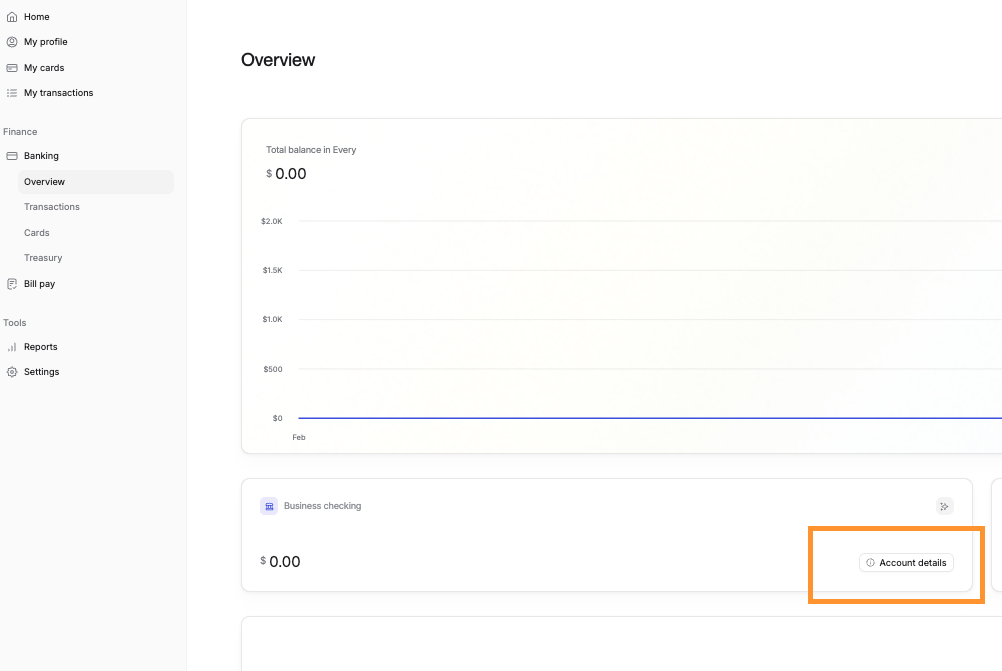
Once you click "Account Details," you'll see a page displaying your complete banking information, including:
Routing number
Account number
Account type
Bank name and address
Company/beneficiary information
You can also download wire instructions or a bank letter from this page using the download buttons at the top.
Note: For security purposes, always use the account details directly from your Every dashboard rather than copying from saved documents or old communications.