Finding Your 2025 Tax Documents (W-2s & 1099s) on Every
Last updated: April 9, 2026
As of January 31st, 2026, all tax documents for payments made through Every payroll in 2025 are now available. Here's what you need to know about accessing your tax documents based on your role:
Available Tax Documents by Role
Full-Time Employees
You will find your W2 tax forms in your Every account.
US Contractors (Paid via Every Payroll)
Your 1099 forms are available in your Every account.
US Vendors (Paid Outside Every Payroll)
Your 1099 forms have been physically mailed to your address since you don't have Every account access.
International Contractors
No tax documents are required or provided for international contractors.
How to Access Your Documents
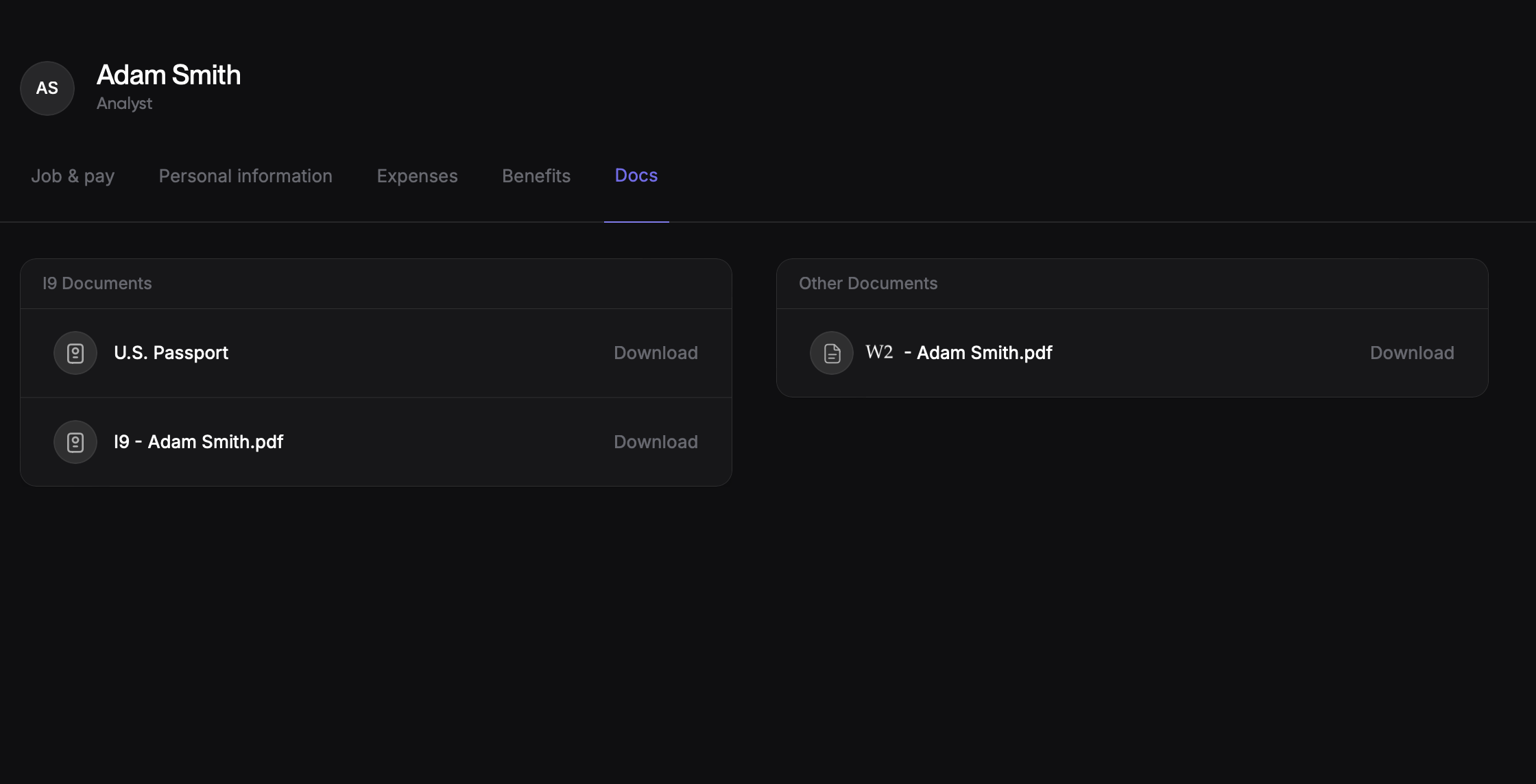
If you're an employee or contractor with Every account access, follow these steps to find your tax documents:
Log in to your Every account
Navigate to your Profile page
Click on the Documents tab
Find your W2 (for employees) or 1099 (for contractors)
Important Note for Vendors
If you're a vendor who received payments outside of Every payroll, your 1099 forms have been sent via physical mail to your registered address. This is because vendors don't have login access to the Every platform and email addresses may not be on file.
Need Help?
If you're having trouble locating your tax documents or have questions about the forms you received, please contact our support team at support@every.io