Filing Your Delaware Franchise Tax
Last updated: March 5, 2025
What is the Delaware Franchise Tax?
The Delaware Franchise Tax is an annual tax that all Delaware (DE) C-corporations must pay to maintain their legal status. It is not based on revenue or profit—it's simply a fee for incorporating in Delaware.
Who needs to file?
All Delaware C-corporations must file and pay this tax, whether they have revenue, employees, or active operations.
Why is it important?
Failing to pay the Delaware Franchise Tax can lead to:
Late fees & penalties – A $200 fine plus 1.5% monthly interest on unpaid tax
Loss of good standing – This can impact fundraising, business contracts, and compliance
Administrative dissolution – Delaware can revoke your corporate status, making it expensive and difficult to reinstate your business
When is it due?
Delaware Franchise Tax is due by March 1st every year.
Step-by-Step Guide to Filing
Step 1: Find your company's file number
You'll need your Delaware business entity number, which you can obtain through one of these methods:
Option 1: Find the file number in the email we sent to founders/responsible parties (up to 9 digits)
Option 2: Search for your entity using Delaware's business entity search. Enter your company's legal name, click search, and copy the file number that appears.
Option 3: Check your official Certified Copy of your Certificate of Incorporation (COI) in your account's Documents & Statements section. The file number is included in the official stamp from the Secretary of State.

Step 2: Access Delaware's filing website
Go to Delaware's Division of Corporations Information Systems (DCIS) website
Enter your company's file number
In the table that appears, select "File Annual Report" next to the applicable tax year
Do not click the "Pay Selected" Quarterly Tax Payment button

Step 3: Enter Employer Identification Number (EIN)
Your EIN can be found in your EIN Confirmation Letter from the IRS (Letter CP 575 or Letter 147C) in your Documents & Statements section
If you're still waiting for your EIN to be assigned, you can leave this field blank

Step 4: Enter the number of shares issued
Don't be alarmed if the initial tax amount seems high—it will be recalculated after you enter all information.
If you incorporated with us:
The number of authorized shares should be 10,000,000
You need to enter the number of issued shares, including:
Shares granted to founders and co-founders
Any additional shares issued (e.g., for another stock class or Employee Stock Option Pool)
If you did NOT issue shares beyond the incorporation process:
Calculate all issued shares by adding up the number of shares granted in your Common Stock Purchase Agreements (CSPAs)
All executed CSPAs are available in your Documents & Statements section
Example: If Founder 1 was issued 5,000,000 shares and Founder 2 was issued 3,000,000 shares, enter 8,000,000 as your total issued shares
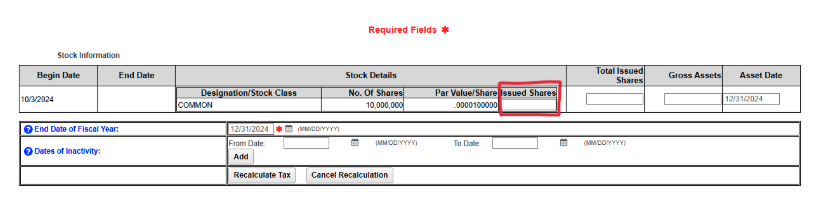
If you DID issue additional shares:
Refer to your cap table management tool (like Carta or Pulley)
Pull up a cap table as of 12/31/2024
Enter the number of "Issued and Outstanding" shares for each class
Step 5: Enter Gross Assets as of December 31, 2024
Gross assets include the total value of assets owned by your business (not profits or revenue):
Cash in bank accounts
Founder & investor contributions
Prepaid expenses
Computers, equipment, or purchased software
Intellectual property (if capitalized)
Do not include liabilities (loans, debts, etc.)
Example scenarios:
Scenario 1: Just incorporated in December with $10,000 in a bank account from founder contributions, no employees, revenue, office space, or significant expenses → Gross Assets = $10,000
Scenario 2: Raised $250,000 from angel investors, spent $20,000 on legal fees and $5,000 on equipment → Gross Assets = $225,000
Scenario 3: No money raised, paid $0 in incorporation fees and $250 in CA foreign qualification fees, opened a business bank account but no deposits yet → Gross Assets likely close to $0
After entering your Gross Assets value as of 12/31/2024, click "Recalculate Tax." Most newly incorporated startups will pay a minimum of $400.
Step 6: Enter the address of your principal place of business
Do not use your registered agent address
Use your primary place of business (HQ) address
Can be a virtual address or home address, but not a PO Box
If this address differs from what we have on file, please update your profile
Step 7: Enter officer information
Enter all officers appointed during the incorporation process (typically founders and co-founders)
Find the list of appointed officers in your Documents & Statements page under "Incorporation Documents" in the file named: "Organizational Board Action in Lieu of First Meeting Consent"
You may use your company's legal address for the officers' addresses (not a PO Box)
Step 8: Enter Board of Directors information
Enter all appointed board directors (typically the same founders and co-founders)
Find the list of appointed directors in your Documents & Statements page under "Incorporation Documents" in the file named: "Action by Incorporator"
You may use your company's legal address for the directors' addresses (not a PO Box)
Step 9: Review and submit
Review your annual report filing
Read and agree to the terms and conditions
Enter the submitter (your) information
Click "Continue Filing" to review the summary
Proceed to the payment screen
Pay via credit card or ACH
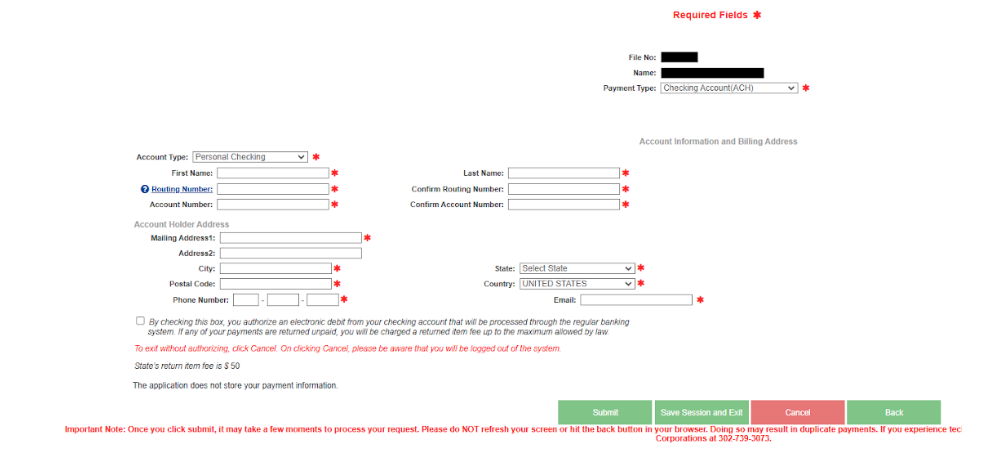
Congratulations! You won't have to worry about this for another year.
Need to save your progress?
If you need to save your progress to complete the filing later:
Click "Save & Exit"
Note the Session Number generated
Use this number to revisit your saved data when you return to the filing
Need Help?
If you have any questions or need assistance with filing your Delaware Franchise Tax, please contact our support team.